Run your cleaning
business without
the chaos.
Scheduling, routes, payroll, and invoicing all in one platform built specifically for cleaning companies.
How it works
Up and running in minutes
No complicated onboarding. Follow the setup wizard and you're scheduling jobs on day one.
Add your customers & properties
Create client profiles with multiple service locations. Set default pricing, frequency, and access notes per property.
Schedule jobs & build your teams
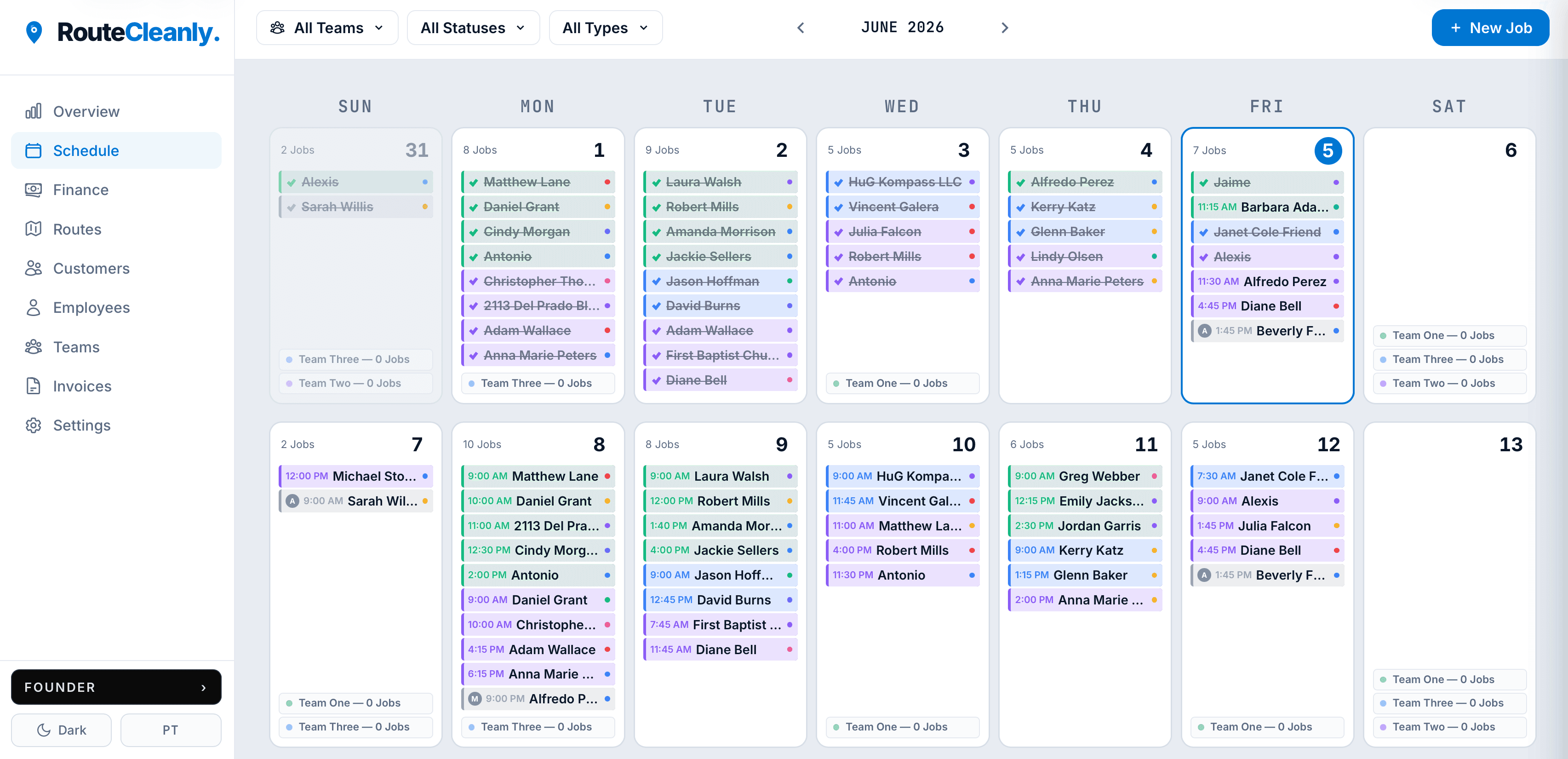
Assign recurring or one-off jobs to color-coded teams. The calendar fills automatically as recurring jobs roll forward.
Track revenue, pay your team
Finance dashboard shows earnings in real time. Payroll calculates automatically — review, mark paid, and generate pay statements.
Platform
Every tool your operation needs
Stop juggling spreadsheets, group chats, and separate apps. RouteCleanly brings your whole business into one clean workspace.
Route Optimization
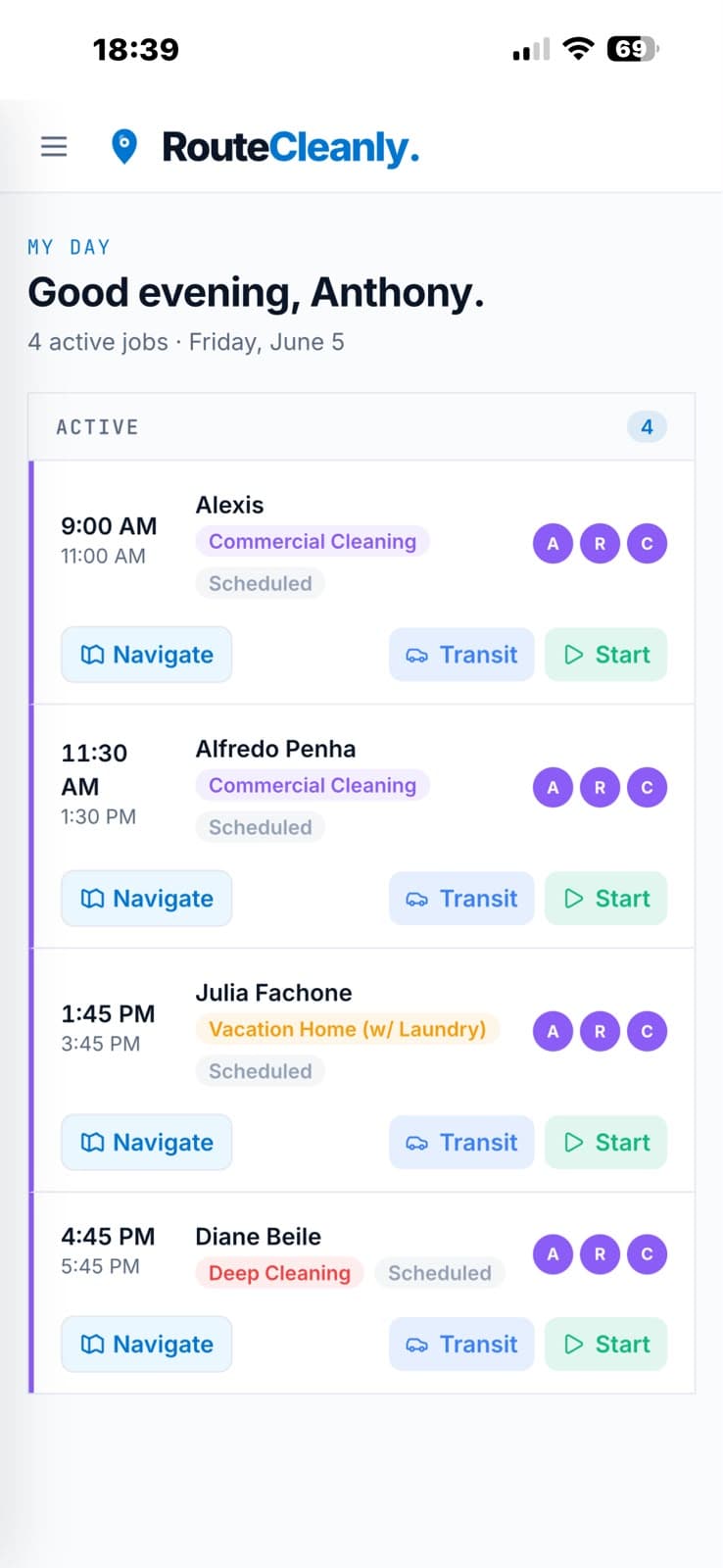
Jobs sorted by shortest path automatically. Reduce unnecessary windshield time and keep daily routes organized.
Recurring Schedules
Set weekly, biweekly, or monthly jobs once. Skip or override any individual visit without disrupting the pattern.
Team Management
Group employees into color-coded teams. Assign jobs by team or individual with a single click.
Invoices & Receipts
Generate PDF invoices from completed jobs. Send to clients via SMS or email. Record payments by Cash, Zelle, ACH, check, or card.
Financial Dashboard
Revenue this month, outstanding balances, and team performance — visible the moment you log in.
Customer Properties
Each customer can have multiple service locations. Set default pricing, cleaning frequency, size, and access notes per property.
Payroll — 3 Modes
Pay your team by job type and team size, by the hour, or on a fixed daily rate. Override any individual amount without breaking the formula.
Secure & Isolated
Each company's data is fully private. Role-based access so employees see only what they need.
Routes Atlas
PlusSee every team on the map, in real time.
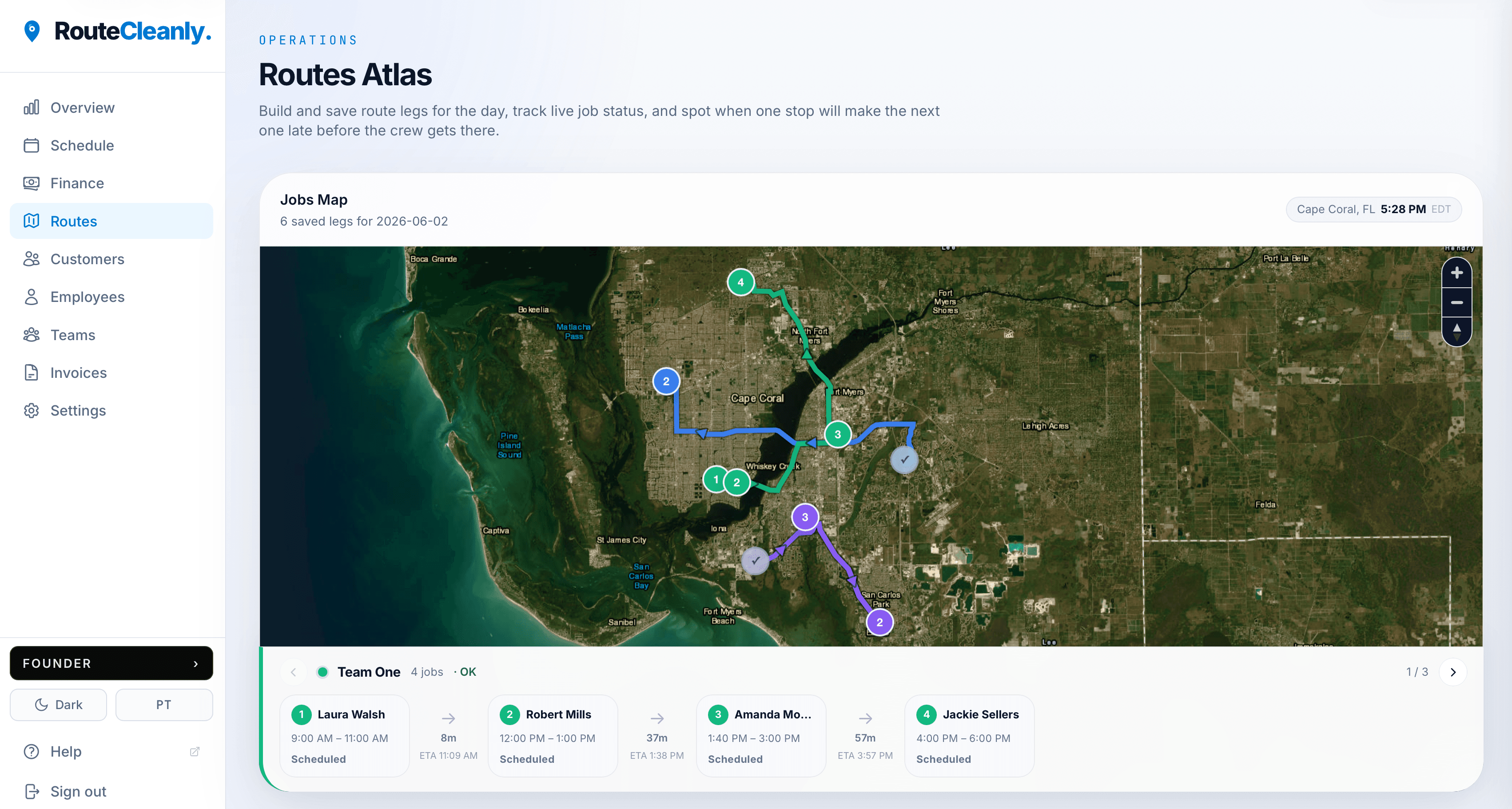
Routes Atlas gives you a live view of all your teams' routes each day — optimized path, job-by-job timeline, and automatic late alerts before a delay becomes a problem.
Generate in one click
Hit Generate for any team and day. RouteCleanly optimizes the job order by shortest path automatically.
Read the map & timeline
Each team gets a color-coded route on the map and a horizontal timeline strip showing jobs in order with travel legs between them.
Catch late runs early
Red alert if a route itself is running late. Amber cascade alert if an early delay will ripple into later jobs — so you can act before it does.
Complete the run
Mark jobs done from the map view. The timeline updates in real time as your teams move through their day.
Late arrival alerts
Calculates the drive time between every job and warns you before a late arrival happens — so you can reorganize the schedule before the crew gets there.
Two types of late alerts
Route late (the team is behind now) and cascade late (a delay will ripple into jobs later in the day).
All teams, one screen
Switch between teams or view all routes at once. Each team gets its own color for instant visual separation on the map.
Payroll
Pay your team without the spreadsheet.
Three pay modes — per job, hourly, or fixed — so every type of employee is covered. You review, adjust if needed, mark as paid, and generate a pay statement, all in one place.
Pick a payroll model
Per job: pay splits by cleaning type and crew size. Hourly: pulled from actual clock-in logs. Fixed: a set weekly amount regardless of job count.
Earnings tracked automatically
Per-job pay is calculated the moment a job is assigned. Hourly and fixed employees accumulate earnings as the week progresses.
Review the weekly grid
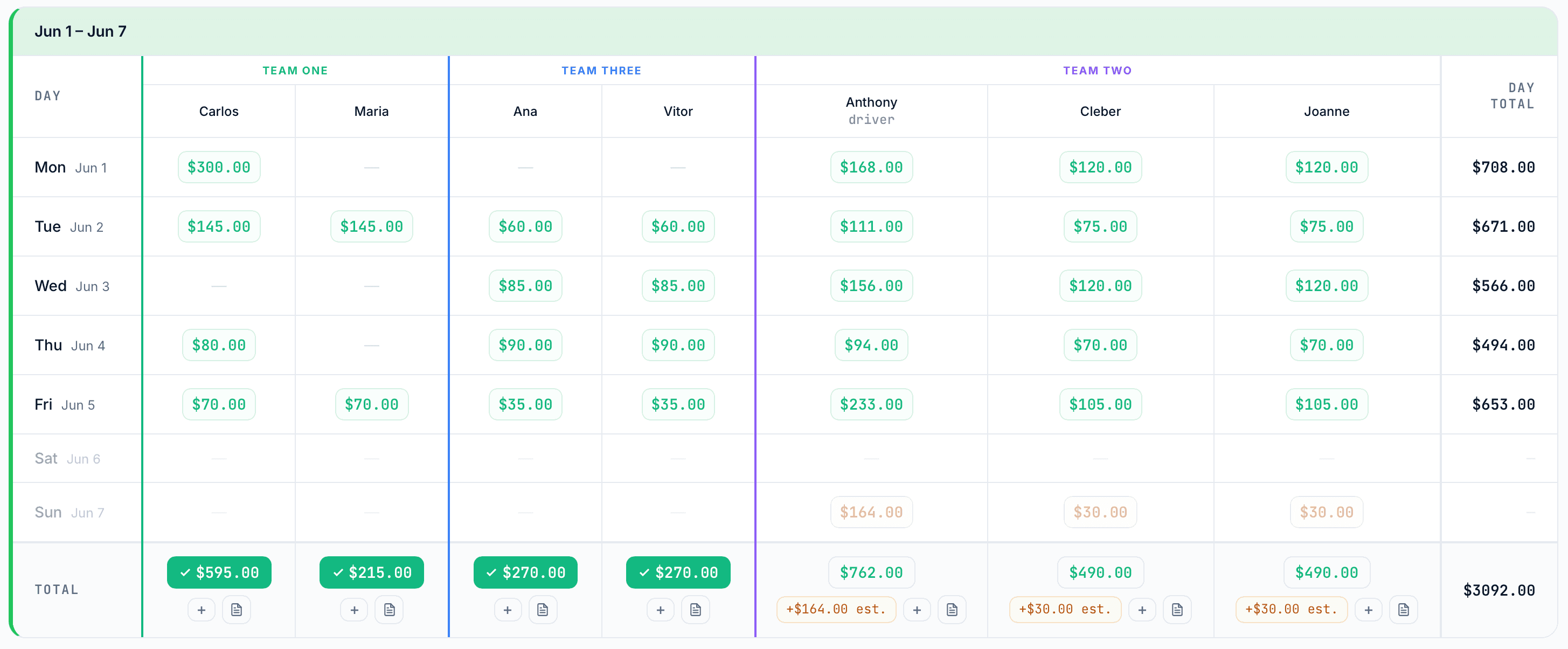
See every employee's earnings day by day. Click any cell to view job details or override the amount for that specific job.
Mark paid & print stub
Toggle a week as paid with one click. Generate a clean PDF pay statement for any employee, any week, instantly.
Driver bonus
You decide which employees qualify as drivers and set the bonus amount. Drivers earn a flat extra per job on top of their base cleaning pay.
Pay overrides
Calculated amounts are a starting point. Override any individual job's pay without affecting the formula for other jobs.
Company bonuses
Add a one-time bonus to any employee for any week — perfect for performance rewards or tips passed through.
Pricing
Simple, transparent pricing
Pick the plan that fits your team. Upgrade or cancel anytime.
Solo
For owner-operators and solo cleaners.
- Up to 2 employees
- 1 team
- Recurring scheduling
- Customer management
- Route optimization
- Invoices & receipts
- PDF invoice export
- Financial dashboard
Starter
- Up to 5 employees
- Up to 2 teams
- Recurring scheduling
- Financial dashboard
- Customer management
- Route optimization
- Invoices & receipts
- PDF invoice export
Plus
- Up to 50 employees
- Up to 8 teams
- Recurring scheduling
- Financial dashboard
- Customer management
- Route optimization
- Invoices & receipts
- PDF invoice export
Every account starts with a 14-day Plus trial — no credit card required. Pick your plan after.
By subscribing you agree to our Terms of Service and Cancellation Policy.
Built for cleaning businesses
Built for cleaning companies that outgrew spreadsheets
RouteCleanly helps cleaning businesses manage recurring jobs, cleaner assignments, daily routes, invoices, and cleaner pay in one workflow.
No credit card required
FAQ
Common questions from cleaning business owners
What is RouteCleanly?
RouteCleanly is a software platform built specifically for cleaning companies. It helps you manage scheduling, recurring jobs, cleaner assignments, route planning, invoicing, and cleaner pay — all in one place.
Is RouteCleanly made specifically for cleaning companies?
Yes. RouteCleanly is designed for residential and commercial cleaning businesses, maid services, Airbnb turnover cleaners, and move-in/move-out cleaning companies. It is not a general field service tool.
Does RouteCleanly help with route planning?
Yes. RouteCleanly organizes your team's daily jobs into optimized routes. You can generate a route for any team and day, view it on a map, and track job order and timing.
Can RouteCleanly replace spreadsheets?
For most cleaning businesses, yes. If you are currently using spreadsheets and group chats to manage jobs, cleaners, and invoices, RouteCleanly is designed to replace that workflow.
Does RouteCleanly handle invoices?
Yes. You can generate PDF invoices from completed jobs and send them to clients via SMS or email. Payment records can be tracked by cash, Zelle, ACH, check, or card.
Does RouteCleanly calculate cleaner pay?
Yes. RouteCleanly supports three pay modes: per job (based on cleaning type and crew size), hourly (based on clock-in logs), and fixed weekly salary. You can review, adjust, mark as paid, and generate pay statements.
Is RouteCleanly a payroll provider?
No. RouteCleanly helps organize cleaner pay information, but it is not a payroll provider and does not provide tax, employment, accounting, or legal advice. You remain responsible for your own payroll compliance.
Stop managing your business
in group chats.
Get your team, schedule, routes, and billing in one place. Takes less than 5 minutes to set up.
No credit card required · Cancel anytime · Plans from $29/mo